
Configure the client once
Different clients handle AI providers in different ways. Some need an API key and base URL for each provider; others bury model selection in a configuration file.
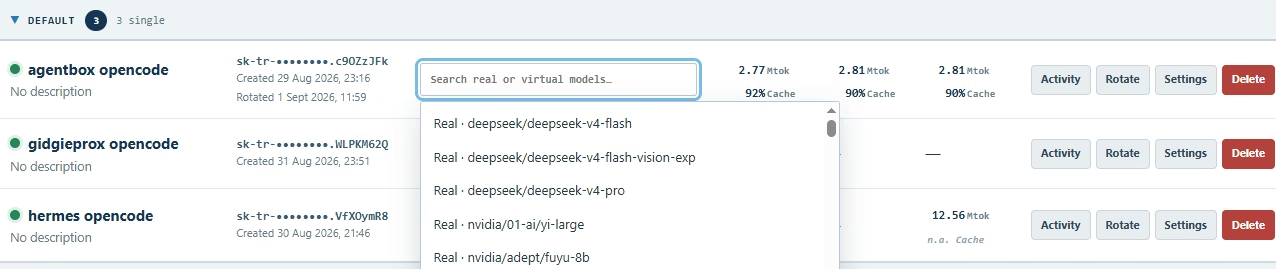
Configure each client once with Tiller’s endpoint and key. Then change which real or virtual model it uses from Tiller. When you try a different provider, you don’t have to revisit every client configuration.
One model or a selected list
Single-model mode assigns one model to a client. You can change that assignment whenever you want.
Catalogue mode lets you choose which models a client can access. The application’s model picker remains available, but only shows the models you’ve permitted.
Bring your own providers
Tiller manages the upstream connection and credentials. Your clients keep talking to Tiller, while you decide which providers and models sit behind their routes. You can mix hosted APIs, local models and compatible third-party endpoints.
The current provider types are:
Hosted and managed APIs
- OpenAI
- Anthropic
- OpenRouter
- DeepSeek
- Z.ai / GLM
- Google Gemini API
- Azure OpenAI
- Amazon Bedrock API key
- Groq
- Mistral
- xAI
- Together
- Fireworks
- Cerebras
- Perplexity
- NVIDIA NIM
- Hugging Face Inference
- Cloudflare Workers AI
- Alibaba / Qwen
- MiniMax
Developer services
- OpenCode Zen
- OpenCode Go
- Command Code
- Ollama Cloud
Local and self-hosted models
- Ollama Local
- vLLM
- LM Studio
- llama.cpp
Other compatible endpoints
- Generic OpenAI-compatible
Support for individual models and API features varies by provider. The wider OpenAI-compatible surface is best-effort in the current beta.
What you need
Connect a provider in Tiller, create a client key, and point a compatible application at Tiller’s endpoint. After that, change the mapping in Tiller instead of repeatedly editing the client.